The itch
Windows has had a clipboard history since 2018. You press Win+V and a small panel drops out of the taskbar. It works, but it lives in the corner of the screen, forgets the moment you focus something else, and never feels like part of the OS.
I use my clipboard like scratch paper. Snippets of terminal output, half a URL, an OTP that times out in thirty seconds, three lines of Python I want to paste into a different repl. The default panel is fine for one item. It falls apart at three.
Around the same time I got a new iPhone and started paying attention to the Dynamic Island. There is something correct about a UI element that sits at the top of the screen, dark most of the time, and expands only when you ask it to. It never covers the content underneath. It has a home. It knows when to disappear.
DynaClip is what happens when I steal that pattern for Windows and point it at the clipboard.
What it does
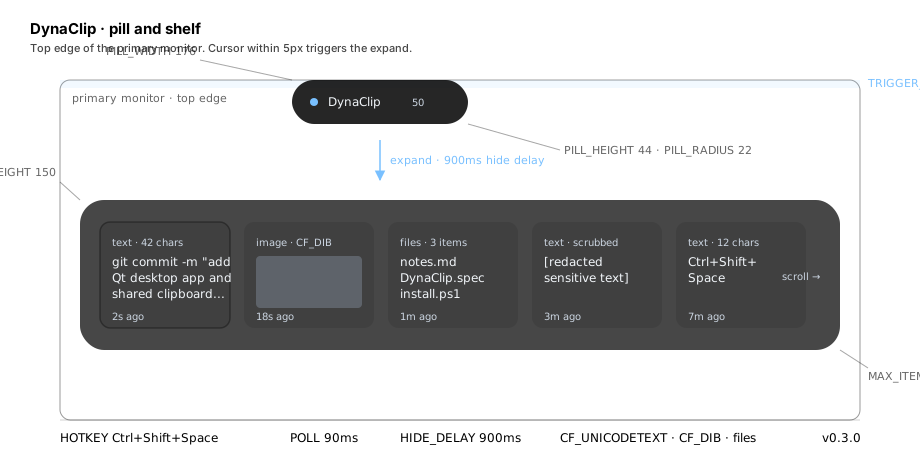
A dark pill, 176 pixels wide and 44 tall, sits pinned to the top edge of the primary monitor, with a 22 pixel corner radius. When my cursor gets within 5 pixels of the top of the screen the pill expands into a 920x150 shelf. The shelf shows the last N clipboard items as horizontally scrollable cards. I click one; it becomes the current clipboard contents; the shelf collapses.
The keyboard path is Ctrl+Shift+Space. Same expansion, same collapse. The whole thing is meant to feel like the notification tray on a phone, not a floating window on a desktop.
The cap is 50 items. Enough for a full working day of copies and not so many that the shelf turns into a database browser. When item 51 lands, item 1 falls off the end.
The interaction, drawn out
flowchart TD
    A[Pointer at top of screen] --> B{Y within 5px<br/>of monitor edge?}
    B -- no --> A
    B -- yes --> C[Pill expands<br/>176x44 to 920x150]
    C --> D[Shelf shows up to 50 items<br/>most recent first]
    D --> E{User clicks<br/>or presses Esc?}
    E -- clicks --> F[Set clipboard to item]
    F --> G[Move item to head of list]
    G --> H[HIDE_DELAY 900ms]
    E -- Esc --> H
    E -- pointer leaves --> H
    H --> I[Shelf collapses<br/>back into pill]
    I --> A
The trigger zone is 5 pixels. A QTimer polls the global cursor position every 90 milliseconds through POINTER_POLL_INTERVAL. Cheap enough not to show up on Task Manager and fast enough that the pill feels like it reacts to me. When the cursor leaves the expanded area, a 900 ms HIDE_DELAY keeps the shelf open long enough that I can drag from the top of the screen down into a card without the shelf snapping shut under me.
Why PySide6, and why the exe is 47 MB
The first version, still in the repo as dynaclip.py at 1814 lines, used Tk. It worked. It looked like Tk. Rounded corners were faked with a bitmap mask, the expansion animation was a stack of geometry changes, and every attempt to make it feel like the Dynamic Island bumped into the fact that Tk was not built for that century.
The rewrite in dynaclip_qt.py (1670 lines) is PySide6. Qt gives me QPropertyAnimation for the shape morph, native transparency, QGraphicsDropShadowEffect, and font antialiasing that looks like the rest of the OS. The move cost me the exe size. PyInstaller output went from 11.5 MB on the Tk build to 47.5 MB after the Qt migration. Qt is not small. I decided I did not care.
dynaclip_core.py (361 lines) is the shared state, so the two builds were briefly two frontends over one clipboard engine while I finished the port. The current pin is APP_VERSION = "0.3.0" on line 46, unmoved since 2026-05-03.
The clipboard, three formats deep
Windows clipboard is a bag of formats and every app writes the ones it cares about. DynaClip reads three: CF_UNICODETEXT (13) for text, the ninety-nine-percent case; CF_DIB (8) for images, a screenshot or a copied cell from Excel; and file lists, so a set of files copied in Explorer shows up as a card with the file names. Anything else the app skips.
Single instance
If DynaClip is already running and I double-click the shortcut, I do not want a second pill. The mutex is a named Win32 kernel object: Local\DynaClipSingleton. The second process finds the mutex already held, sends a message to the running one over a hidden window, and exits.
The security bits I could not skip
The clipboard holds passwords more often than anyone wants to admit. A password manager copies a value, a terminal echoes a bearer token, a Slack thread includes an API key. If I hold the last 50 things I copied, I hold those.
The history file is protected with DPAPI. dpapi_protect() and dpapi_unprotect() wrap crypt32.CryptProtectData with CRYPTPROTECT_UI_FORBIDDEN so the app never prompts, and the resulting blob is tied to the current Windows user profile. Copy the file to a different machine and it does not decrypt.
The log file uses an EncryptedRotatingFileHandler and holds the last 400 entries. scrub_sensitive_text() runs a set of regexes over new clipboard entries before they are indexed. It matches api[_-]?key, password, secret, bearer , ghp_[a-z0-9]+ for GitHub tokens, and sk-[a-z0-9]+ for the OpenAI shape. Any match is replaced with [redacted sensitive text]. A rough filter, not a security guarantee. Enough that a casual glance at the shelf does not show my Anthropic key back to me in a screencap.
The Chrome extension companion
There is a chrome-extension/ directory that is a Manifest V3 prototype, DynaClip Popup at version 0.1.0, reusing the same 50-item cap. Permissions are storage and clipboardRead, host permissions are <all_urls>. Service worker plus side panel. The interesting piece is the hover behavior: default hoverDelayMs is 800 milliseconds and the message shapes are capture-copy, add-text, and set-hover-settings. Hover over a link, wait 800 ms, it copies. I have not shipped this anywhere and I am not sure I will.
What the repo actually looks like
Seven commits. The arc reads: e963f9b Initial commit -> f91b19a PUSH (first PyInstaller build) -> 2b5a210 Update README.md -> b0641fa for the Tk app plus the Inno Setup script and release scaffolding -> 9eb2a2c for the landing page -> 8d9299a, the big one where I extract the shared core, add the Qt app, and drop in the Chrome extension -> d85d5a1 for the responsive layout pass. The project fits in about ten Python files, a .spec for PyInstaller, a .iss for Inno Setup, three PowerShell scripts for install/uninstall/build, and a set of markdown files (THINKING.md, QA_MATRIX.md, PRE_RELEASE_AUDIT.md, RELEASE_CHECKLIST.md, RELEASE_NOTES_0.3.0.md) I write for myself.
The landing page at landing/index.html is 166 lines of dark-themed HTML in Plus Jakarta Sans and Geist Mono, with #79c0ff as the accent. It points at the README and the release checklist. Developer-facing, and I have not tried to make it otherwise.
What I still owe this project
THINKING.md has a note that the README says MIT and the actual LICENSE file is CC0 1.0. That mismatch has been open for a while and I have not decided which I want. There is no code signing today, the PyInstaller .spec has no codesign_identity, and Windows SmartScreen treats a self-signed 47 MB Python bundle the way you would expect. No CI, no telemetry, no crash reporter, so I have no idea how many people have run the installer.
For the moment I do not need any of that. I need a pill that remembers the last 50 things I copied and lets me click one. That is what runs in my tray right now.